5 Google Drive Organization Tips That Make Your Business Run More Efficiently
Google Drive is one of the most widely used tools for running a business, but for many entrepreneurs, it quickly becomes a digital storage closet.
Files get saved with good intentions. Screenshots pile up. Templates disappear into folders. Team members create their own systems. Before long, finding a document takes longer than creating a new one.
A well-organized Google Drive is not just about neat folders. It is about creating a system that helps you and your team find information quickly, collaborate effectively, and keep operations moving.
Here are five Google Drive organization strategies I regularly recommend to clients to help them save time and reduce unnecessary friction behind the scenes.
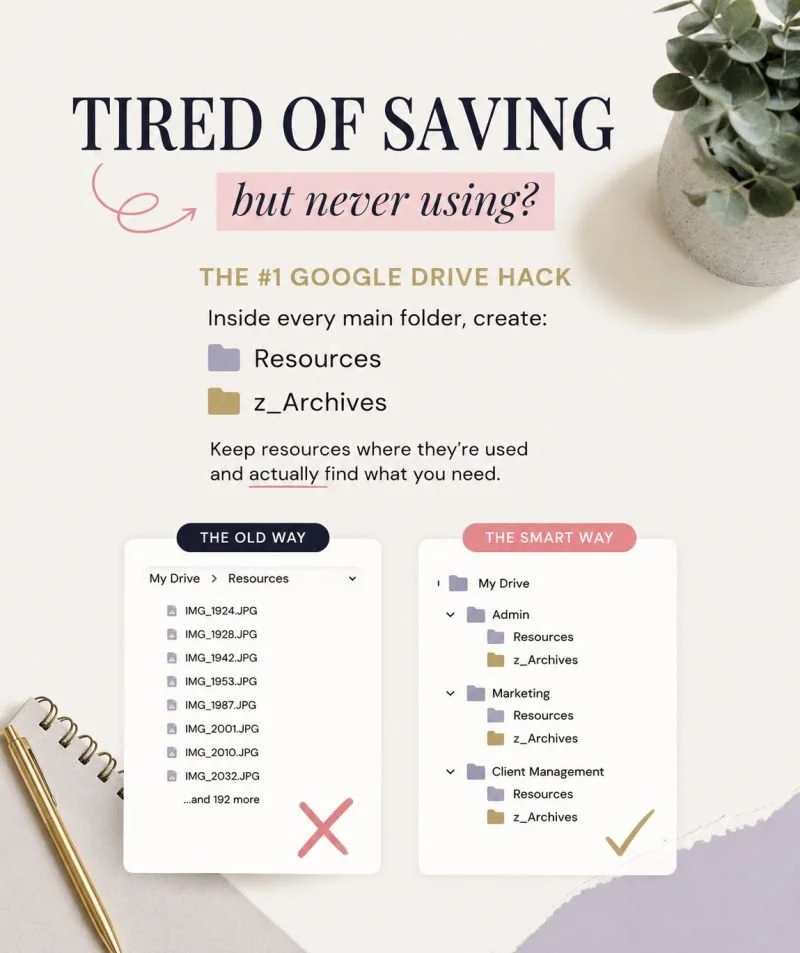
Click Photo to see Kendra’s LinkedIn Post
1. Create Resources and Archives Folders Within Every Department
One of the most common mistakes I see is a single "Resources" folder containing hundreds of unrelated files.
While it seems organized at first, it becomes difficult to find anything when every saved screenshot, template, PDF, and reference document lives in one place.
Instead, create two standard folders inside every major business area:
Resources
z_Archives
For example:
Admin
Resources
z_Archives
Marketing
Resources
z_Archives
Sales
Resources
z_Archives
Client Management
Resources
z_Archives
This keeps resources close to where they are actually used. Marketing templates stay in Marketing. Client onboarding examples stay in Client Management.
The goal is not to save more resources. The goal is to actually use the resources you have already saved.
2. Use One Parent Folder for Your Entire Business
Every business should have a single parent folder that contains all business-related files and folders.
For example, my parent folder is:
Kendra Harris Co
Inside that folder live all operational departments, client files, marketing assets, financial documents, and internal resources.
This structure provides several benefits:
Easier permission management
Cleaner file sharing
Better team onboarding
Reduced risk of files being stored in random locations
When everything lives under one parent folder, your business has a clear digital home instead of scattered folders spread across Google Drive.
3. Use Numbering to Control Folder Order
Alphabetical organization only gets you so far.
Google Drive automatically sorts folders alphabetically, which often creates an order that does not match how you actually use your business.
A simple solution is to number your primary folders:
01_Admin
02_Sales
03_Marketing
04_Operations
05_Client Management
This gives you complete control over folder placement and creates a consistent experience for anyone working inside your Drive.
It also makes onboarding easier because team members immediately understand how the business is structured.
4. Establish a Consistent File Naming Convention
Even the best folder structure breaks down when files are named inconsistently. A standardized naming convention makes searching and sorting significantly easier.
One of the most effective approaches is to format dates using:
YYMMDD
YY.MM.DD
For example:
260606_MonthlyReport
26.06.06_ClientMeetingNotes
260606_ContentCalendar
This format keeps files in chronological order automatically and eliminates confusion about whether a date is written as month/day/year or day/month/year.
The same principle applies to all files. Consistency matters more than the exact format you choose. When everyone follows the same naming convention, files become easier to find and manage.
5. Delete What You No Longer Need
Archiving is important, but not everything deserves to be archived.
Many businesses hold onto outdated drafts, duplicate files, expired resources, and documents that no longer serve a purpose.
Over time, this creates unnecessary clutter and makes it harder to find valuable information.
Ask yourself:
Is this file legally required?
Is this file operationally useful?
Will anyone realistically reference this again?
If the answer is no, delete it. A streamlined Google Drive is easier to maintain, easier to navigate, and easier for your team to use.
Organization is not just about creating systems. It is also about removing what no longer belongs in those systems.
The Real Purpose of Google Drive Organization
Google Drive organization is not about creating the perfect folder structure. It is about creating a system that supports the way your business operates every day.
When your files are easy to find, your team spends less time searching, less time recreating work, and less time dealing with unnecessary operational bottlenecks.
Small improvements to your Google Drive can have a significant impact on efficiency, collaboration, and scalability over time.
If your Google Drive feels cluttered, disorganized, or difficult to maintain, it may be time to implement a more intentional structure. Creating systems that are easy to follow and easy to maintain is at the core of sustainable business operations, and a well-organized Google Drive is one of the simplest places to start.
Ready to talk about which support is right for you?
Let’s connect on LinkedIn!